
The following article is part of a group of posts I made on a Discord server.
Original publication date: 2024-09-13
— Previous: Variables, Memory, and Types (Part 1 of 3)
Variables, Memory, and Types (Part 2 of 3)
Variables and Memory
If memory is so large, how does it know where my variable is?
Memory uses addresses to locate groups of cells. It turns out that variable names are labels linked to the memory address where our value is located. So, when we ask for the variable’s content, the computer must go to that memory location to retrieve the value stored there (in its cells); the same process happens when saving a value.
Variables by Reference
PSeINT won’t be the last place you encounter a reference to references (yes, that was on purpose 😆). Generally, when people talk about a reference, they mean the memory address linked to the variable.
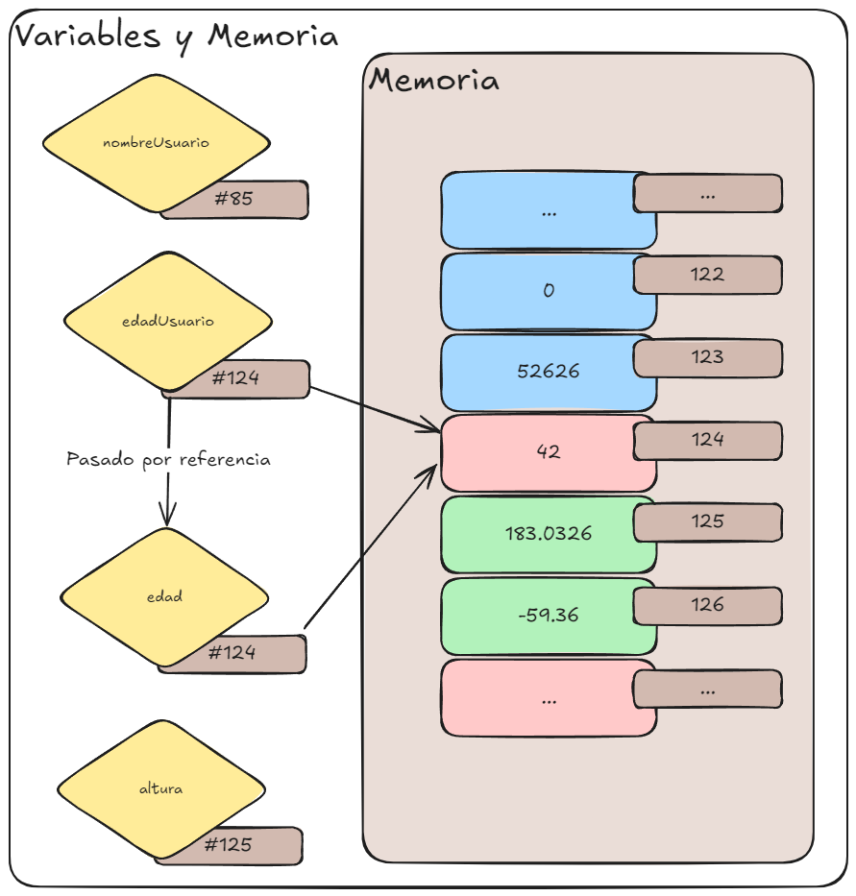
Let’s say the variable userAge is linked to address 124 (cell group #124). Passing the reference to a function or another variable means we are passing address 124… It’s like giving the variable an Alias, because now two labels are linked to the same memory address (image-1).
image-1
Variables by Value
This is simply making a copy of the value in another part of the memory that the program can use and modify, but without disturbing or modifying the original variable.
Types
Types are meta-data (data about data), and their purpose is to provide information about what the set of bits stored in the variable represents. In other words, they tell us how to interpret the current state of a set of cells—let’s say 1 byte (to make the example more concrete).
A byte with the following state FTTFTFTF (where T is 1 and F is 0) represents the binary number 01101010. Depending on the type, it is interpreted as:
- Real:
1.49e-43 - Integer:
106 - Boolean:
True - Character:
j
We, or the program, are the ones who give meaning to the stored data.
— Downloads
Excalidraw File— End of section